A cloud region goes down — not a server, an entire Azure or AWS region. The only questions that matter in that moment were decided months earlier: how fast can you come back (RTO), and how much data will you lose getting there (RPO)? Those two numbers define a ladder of disaster-recovery strategies, from cheap-and-slow to instant-and-expensive. This post walks all four tiers with a dedicated diagram for each, mapped onto how Microsoft's Azure Well-Architected Framework actually frames them.
The two words everything hangs on
Straight from the Azure WAF definitions:
- RTO — Recovery Time Objective: the maximum acceptable time to restore operations after a disaster. How long you can be down.
- RPO — Recovery Point Objective: the maximum acceptable data loss, measured in time. An RPO of "5 minutes" means a disaster may erase your last 5 minutes of writes.
One more pair drives every design below — replication mode: synchronous replication writes to both locations at once (zero data loss, higher latency — Azure's guidance reserves it for high-priority data across availability zones), while asynchronous replication writes locally first and copies after (some loss possible, lower latency — the norm across regions). Your RPO is, in practice, your replication lag.
And the guiding Azure principle, stated first because it reframes everything: prioritize by business impact. Categorize workloads by criticality (mission-critical, business-critical, business-operational), and derive RTO/RPO from that. DR is not one decision for the company — it's a dial you set per workload.
Tier 1 — Backup & Restore (Azure: active-passive, cold)
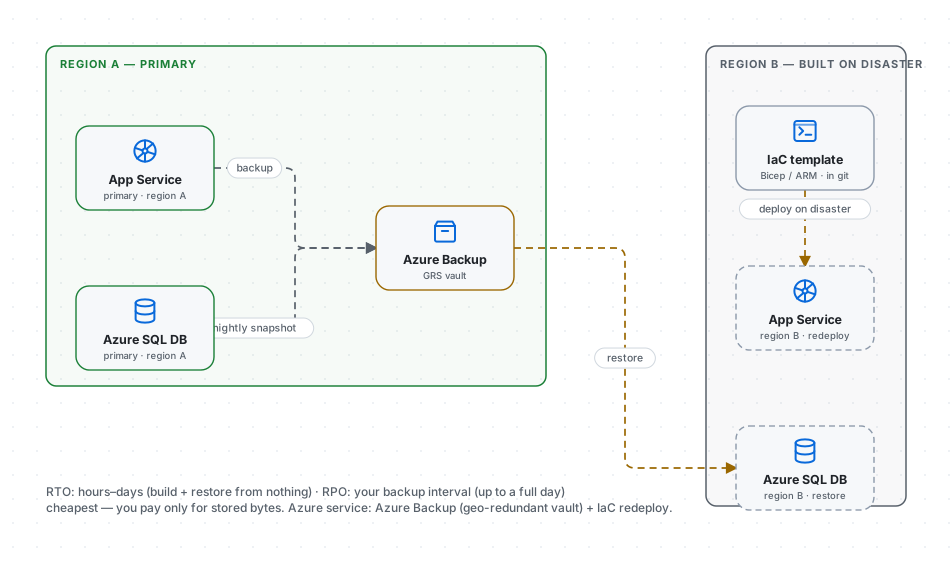
Snapshots to a geo-redundant Azure Backup vault; nothing runs in the second region until disaster strikes, when you redeploy the stack from infrastructure-as-code (Bicep/ARM) and restore.
- RTO: hours to days — you build the environment from nothing under pressure.
- RPO: your backup interval — nightly backups mean up to a day of data lost.
- Cost: lowest — you pay only for stored bytes.
Azure services: Azure Backup (VMs, Azure Files, SQL) with a geo-redundant vault; redeploy via IaC held in git. The trap the WAF hammers on: an untested restore is a hope, not a plan — teams discover during the disaster that the runbook was never rehearsed and takes triple the guess. Fit: dev environments, internal tools, anything where "back tomorrow, minus last night" is genuinely fine. Download this diagram.
Tier 2 — Pilot Light
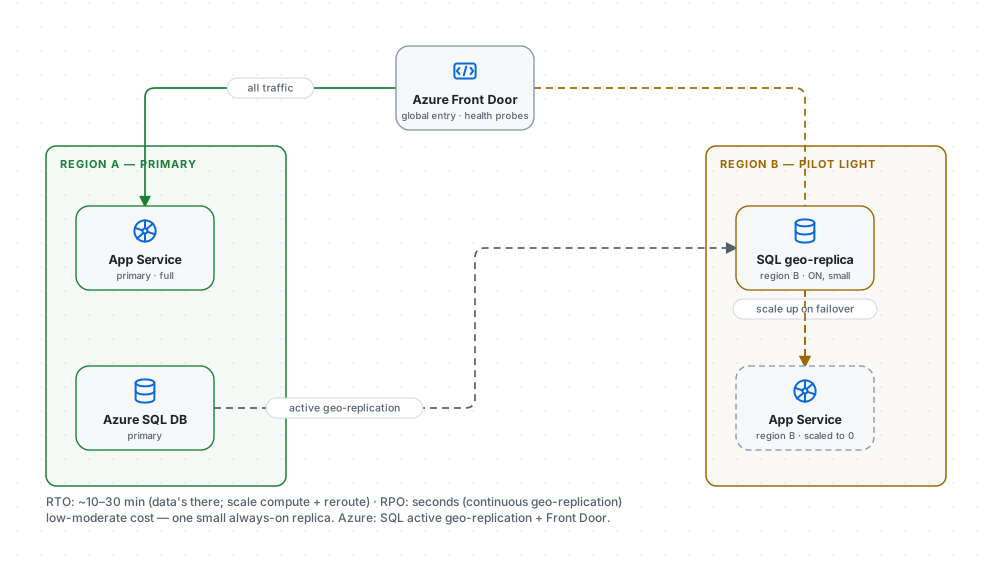
Keep the core alive: a database geo-replica receiving continuous replication in region B, with the app tier defined but scaled to zero — a pilot flame, always lit, ready to ignite the rest.
- RTO: ~10–30 minutes — the data's already there; you scale compute up and reroute.
- RPO: seconds — continuous replication, not nightly snapshots.
- Cost: low-moderate — one small always-on replica, not a full standby fleet.
Azure services: Azure SQL active geo-replication (or an auto-failover group) keeps the replica current; Azure Front Door health-probes and reroutes; the app scales up on failover. The pragmatic sweet spot for a lot of serious systems. Download this diagram.
Tier 3 — Warm Standby (Azure: active-passive warm standby)
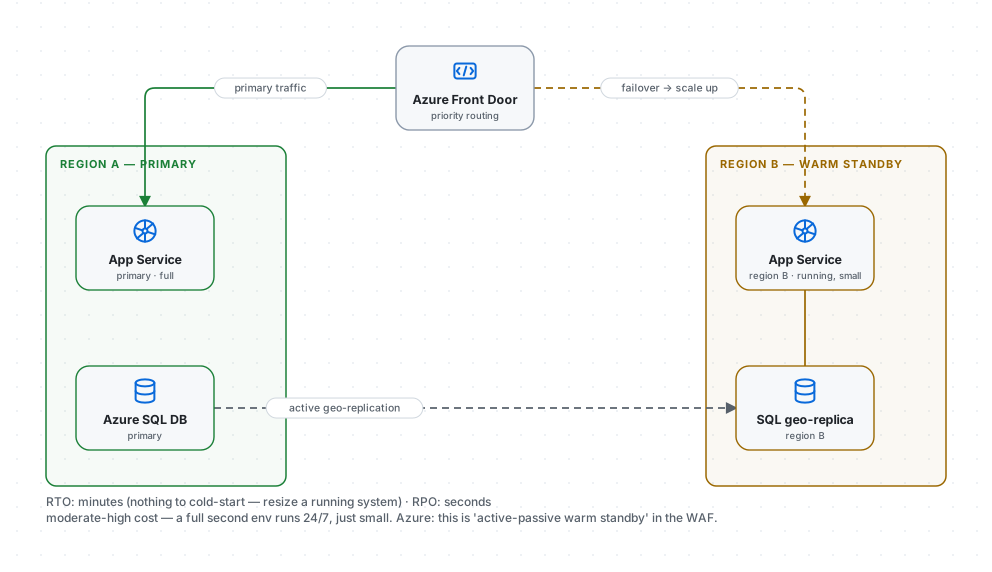
Azure names this one explicitly: active-passive warm standby — "some infrastructure pre-deployed and running at reduced capacity." A complete copy of the system runs in region B, every component live but under-provisioned. On disaster you don't start anything; you scale what's already running.
- RTO: minutes — nothing to cold-start; you resize a running system.
- RPO: seconds — continuous replication.
- Cost: moderate-high — a full second environment runs 24/7, even if small.
Azure services: Front Door priority routing sends traffic to A and fails to B; both run App Service + a SQL geo-replica. This buys down the pilot light's one real risk — the scramble of scaling from zero under load, where cold caches and thundering herds bite exactly when you can least afford them. Download this diagram.
Tier 4 — Hot Standby / Active-Active
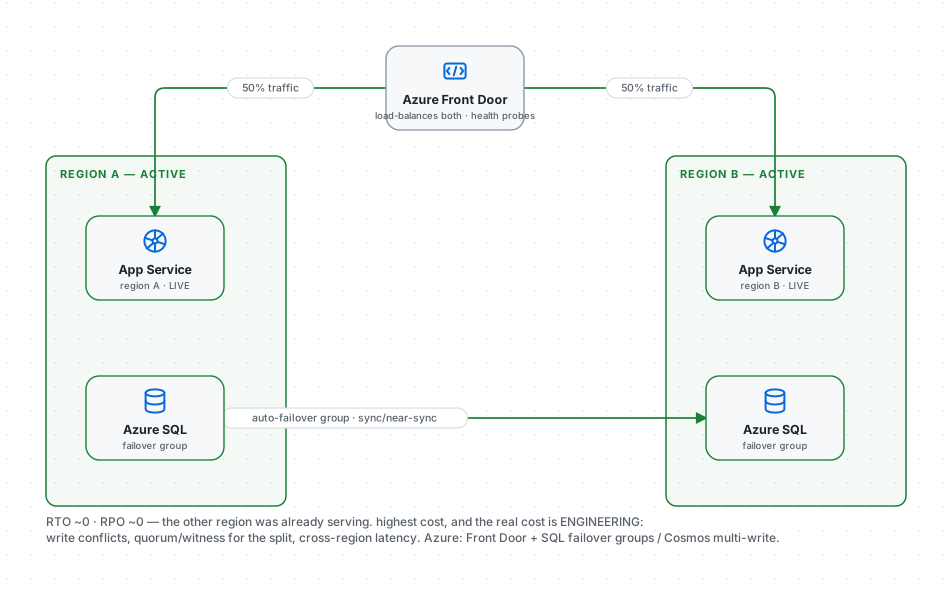
Two (or more) regions both live, both serving real traffic. There is no dramatic "failover" — Azure Front Door health-checks the regions and simply stops routing to a sick one; users may never notice.
- RTO: near zero — the other region was already handling requests.
- RPO: near zero — synchronous or near-synchronous replication.
- Cost: highest — full capacity in every region, plus the hard engineering of active-active.
Azure services: Front Door load-balancing, SQL auto-failover groups or Cosmos DB multi-region writes for the data plane. And that engineering is the real cost, not the servers. Active-active drags in every hard problem we've covered: write conflicts when both regions accept writes (consistency models), the quorum math of a witness region so a split doesn't strand you, and cross-region transaction latency. It's the multi-region active-active template in our gallery — a tier you grow into, not one you start with. Download this diagram.
The principles the Azure WAF insists on
The strategy is only half the job. Microsoft's framework is blunt about the rest:
- Failback is a separate process from failover. Getting traffic back to the primary region after it heals is its own plan with its own runbook — teams that conflate the two get confused mid-incident and leave systems half-restored.
- Test with real drills. Tabletop exercises train the team; production game days are the only way to verify RTO/RPO actually hold. Netflix's Chaos Kong (killing a whole region on purpose) exists precisely because an un-executed DR plan is fiction. The WAF even warns: rehearse in non-production first.
- Design for partial failover. Containment and isolation let you fail over one component without declaring a full disaster — lower cost, lower RTO, and sometimes no user-visible outage at all.
- Keep the plan and its tools available during the outage. Runbooks, credentials and CI/CD pipelines must be replicated across regions (and kept offline as a last resort) — a DR plan stored only in the region that just died is no plan.
- Account for what you don't control. DNS propagation, provider-side failover — measure their real delays when you compute recovery time.
How to actually choose
Don't start from the tiers — start from the business:
- Tier your workloads, not your company. Your payments ledger belongs on tier 4; your marketing site on tier 1. Uniform DR is how budgets die.
- Price the downtime. "One hour of outage costs $X" turns DR from a religious argument into arithmetic: if the next tier costs less than the downtime it prevents, buy it.
- Match replication to the tier. Sync across availability zones for the crown jewels; async across regions for everything else — and remember your RPO is only as good as replication lag under stress.
Import any of these diagrams into techdiagrams.net and map your own services onto the ladder — the ledger on tier 4, the reporting job on tier 1, most things in between. Seeing all four at once makes the real lesson land: DR isn't a single decision you make for the company; it's a dial you set per workload, priced against what an hour of darkness actually costs.